Your files, off-site, in a bucket you own.
Offsite backs up your folders to your own Backblaze B2 storage — as plain files you can read with or without us. Automatic backups, tested restores, and a way back to older versions.
Try the public beta free. No purchase or license key needed.
The deal, plainly
You pay Backblaze for storage. We never touch it.
Offsite connects to a Backblaze B2 bucket in your account — the setup wizard
creates it with you in about five minutes. Storage runs ~$7/TB/month, billed
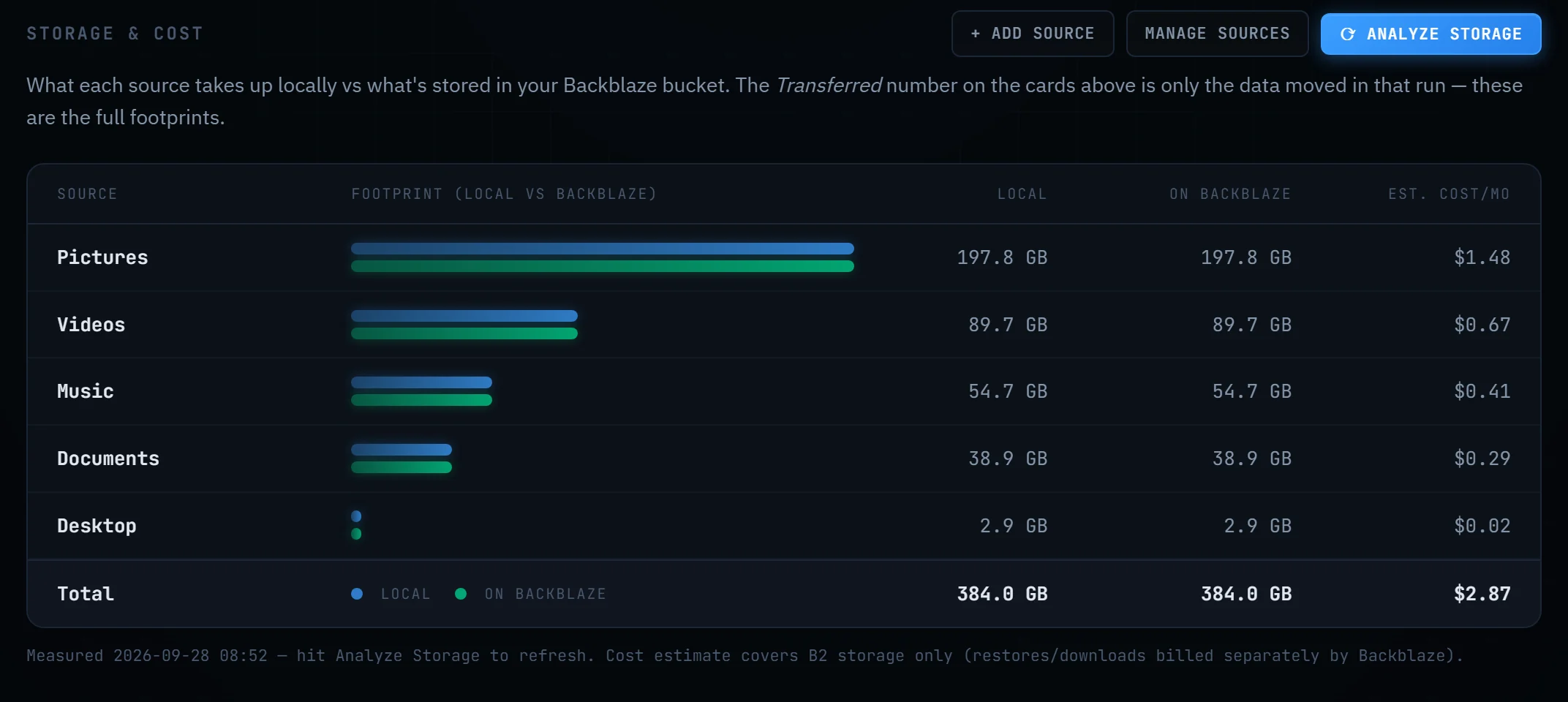
by Backblaze to you. A typical Documents folder costs pennies. The app shows the real
number next to every source.
Backups you can read without our software.
No proprietary archive, no encrypted blob format, no lock-in. Your bucket contains your folders, as folders. If Offsite disappeared tomorrow, everything is still there — browsable from Backblaze's own website or any standard tool.
Restores are tested, not assumed.
A backup nobody has restored from is a hypothesis. Offsite's verify step pulls a real
file back from your bucket and checks its fingerprint against what Backblaze stored — then
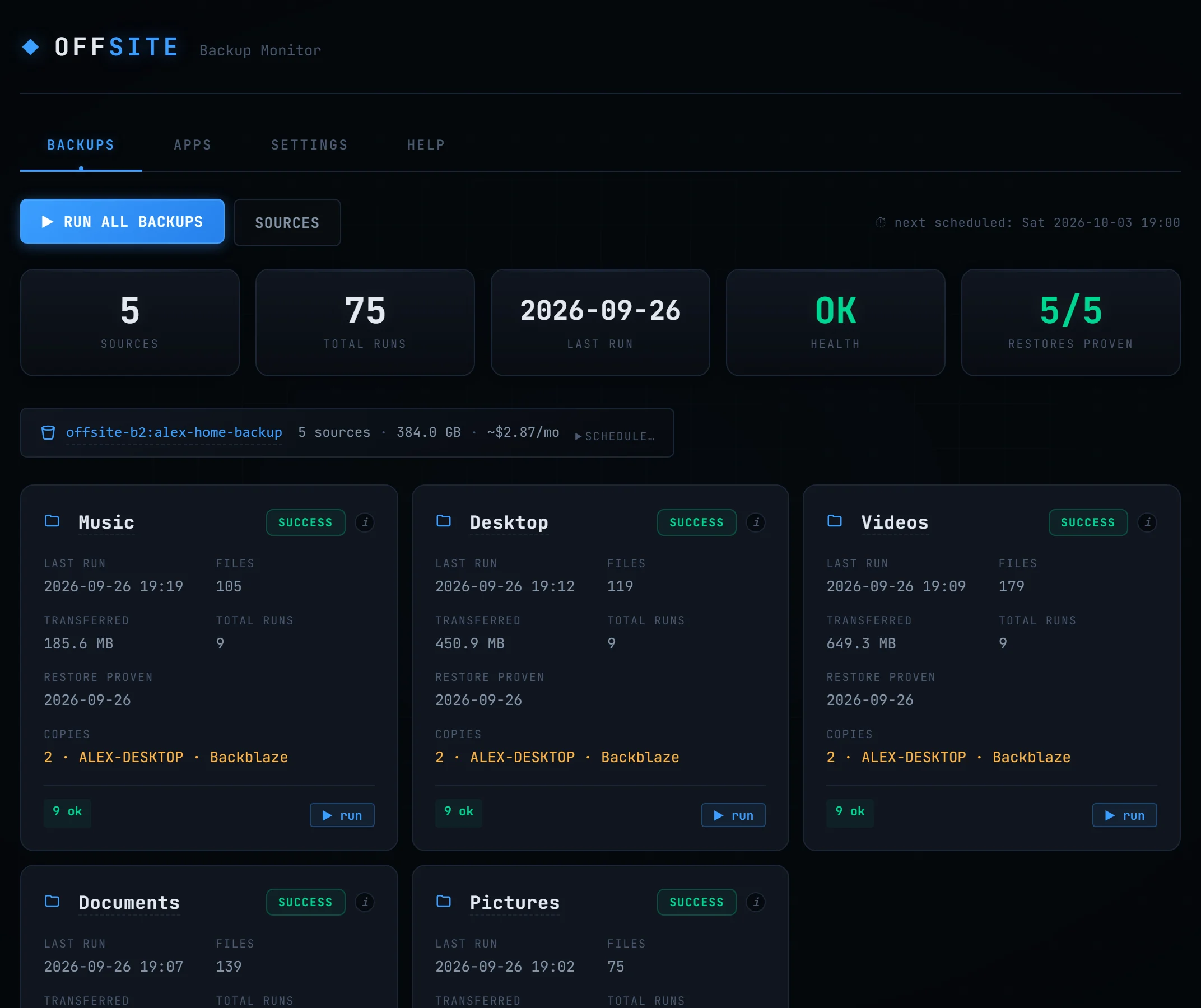
prints Restore proven with the date on the dashboard.
How it works
Pick your folders
Documents, Desktop, Pictures — or anything else. Add per-folder rules if you like: keep-everything mode, exclude patterns, custom destinations. Cloud accounts (Google Drive, OneDrive, Dropbox, Box, pCloud) can be sources too.
Connect your bucket
The wizard walks you through Backblaze B2 keys and creates the bucket for you. Prefer Amazon S3, Wasabi, or Cloudflare R2? Bring your own — same app, same plain files.
Let it run
A weekly schedule runs in the background from the system tray. Old versions of changed files are kept on a retention window you control. Browse the bucket and restore any file, any version, from inside the app.
Specification
| Engine | rclone, the battle-tested open-source sync tool, bundled and driven by Offsite — with retries, stall detection, and junk excludes handled for you. |
|---|---|
| Schedule | Weekly, per-source overrides, catch-up for missed runs, start-at-login tray mode. Optional bandwidth limit with quiet hours so backups never slow down your calls. |
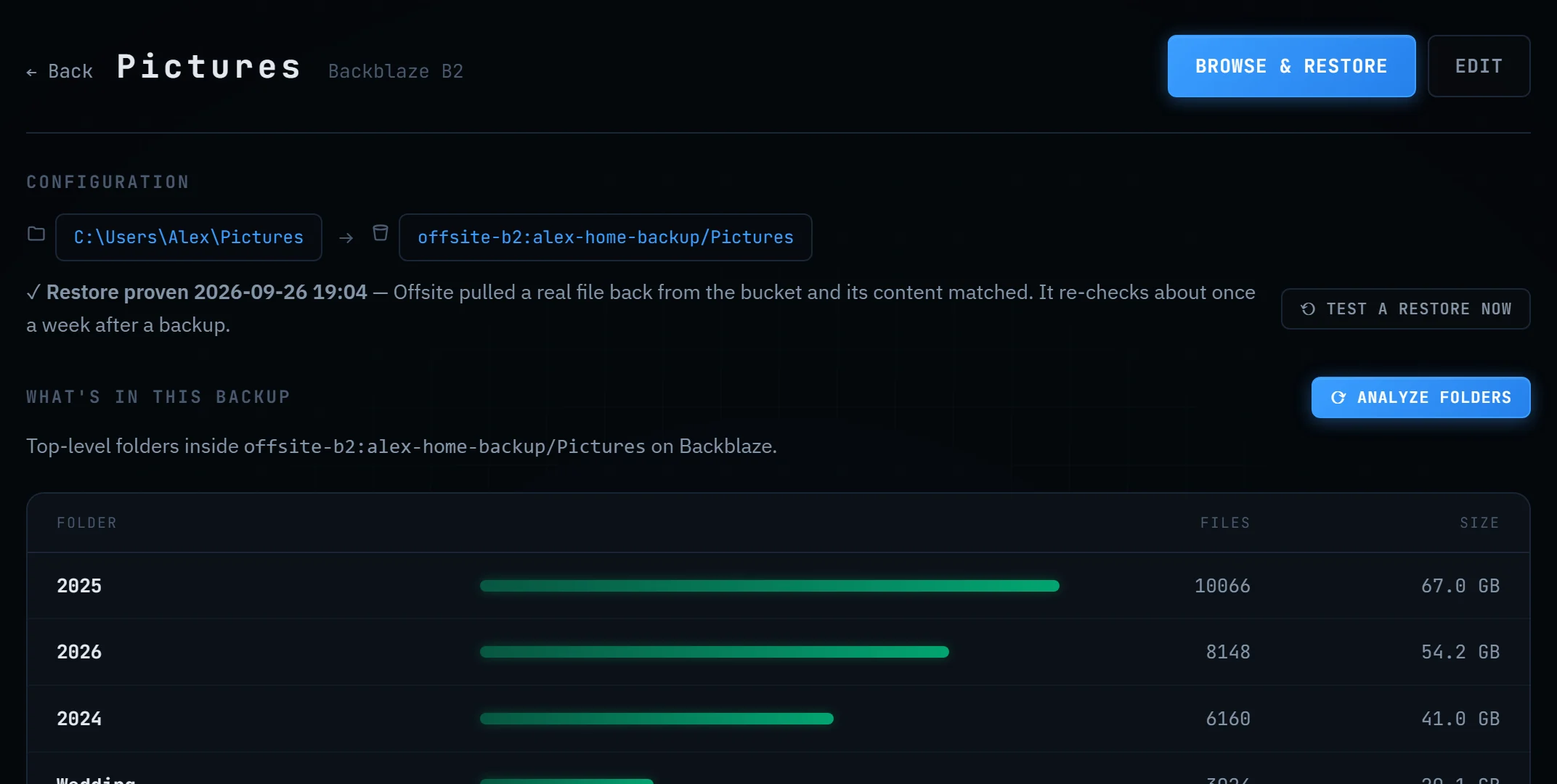
| Restores | Browse the bucket level by level, restore any file or folder, flip a switch to see old versions of overwritten and deleted files. Restore-cost estimates shown before you download. |
| Verification | Every verify run pulls a random file per source back from storage and checks its SHA-1 fingerprint. The dashboard shows when a restore last actually worked. |
| Alerts | A failed, partial, or quietly stale backup messages you — Discord, Slack, or Teams webhook, or email through your own provider. Sent straight from your machine; a test button proves it works before you ever need it. |
| Storage | Backblaze B2 first-class; Amazon S3, Wasabi, Cloudflare R2, and other S3-compatible providers supported. Cost estimates use your provider's real prices. |
| Extras | GitHub account mirroring (private repos included, tokens kept in the OS credential store), cloud-to-cloud backup, retention editing in plain language, an in-app Help page that explains every status. |
| Platforms | Windows 10/11 and macOS 13+ (Apple Silicon and Intel; signed and notarized by Apple). Linux later. |
What we don't do
Subscription
Offsite has zero recurring cost per user — backups run on your computer, storage is your own account. Charging you monthly for that would be a tax on forgetting to cancel.
Servers of ours in the middle
Your files travel from your computer to your bucket. They never pass through, or rest on, anything we run.
Proprietary formats
Some backup tools store your data in chunked, encrypted repositories only they can read. Offsite stores folders as folders — readable with or without us, forever.
Telemetry
The app phones home for exactly one thing: checking its own public releases page for updates. Your file names, sizes, and habits stay on your machine.
Pricing
The fine print, printed large
- One purchase covers you — up to 3 of your own computers.
- Storage is billed by Backblaze directly: $6.95/TB/month, first 10 GB free. Offsite never touches your money after the $10.
- We're in public beta. The download works without paying, and there's no key to enter yet. Buying now buys the real license: it's yours forever, and when license keys arrive, beta buyers get theirs by email. Until then, we trust you.
- Updates are free. There is nothing to renew.
Questions people ask
Why do I need a Backblaze account?
Because the whole point is that you own the storage. Backblaze B2 is the cheapest reputable cloud storage there is ($6.95/TB/month, first 10 GB free), and the setup wizard walks you through connecting it in a few minutes. Your data, your account, your bill — Offsite is just the machinery that keeps it filled and verified.
How is this different from Backblaze's own Personal Backup?
Personal Backup is $99 a year per computer for unlimited data, kept in Backblaze's service. Offsite is $10 once for up to three computers, with your files as plain folders in a B2 bucket you own, billed at $6.95/TB/month. Under about 1.2 TB per computer Offsite costs less; above that, Personal Backup does. The full, honest comparison.
What happens if I stop using Offsite?
Nothing bad. Your bucket still holds your folders as plain files. Log into Backblaze's website and download them, or point any standard tool at the bucket. That's the difference between a backup you own and a backup you rent.
Is my data private?
Your files go straight from your computer to your bucket over TLS — no servers of ours in between, no telemetry. Access keys are stored by rclone on your machine; GitHub tokens live in your operating system's credential store. Offsite's own database holds metadata only, never secrets.
Windows shows a SmartScreen prompt when I install. Why?
Since v0.6.4 the installer is code-signed through Microsoft's Trusted Signing, so the prompt should name the publisher — Elias Gomez — instead of "Unknown publisher". Windows can still pause on a brand-new release while it builds a reputation for that signature; if it does, check that the publisher line says Elias Gomez, then click "More info" → "Run anyway". If it says "Unknown publisher", you are not holding our file — download again from this page. Every download here is the same file we build in public CI from the source.
It's free to download but costs $10. Which is it?
Both, during the beta. Anyone can download and use Offsite today with no key and no nag. The $10 buys a personal license — up to 3 of your own computers, forever. We're not enforcing it yet; when license keys go live, everyone who bought during the beta gets a key by email and keeps going. Buying now is how you say "keep building this".
How do I open it on a Mac?
Pick the build for your chip (Apple menu → About This Mac: "Apple M1/M2/M3/M4" → Apple Silicon, "Intel" → Intel), unzip it, drag Offsite.app into Applications, and open it.
Offsite for Mac is signed and notarized by Apple. The first time you open it, macOS asks whether you want to open an app downloaded from the internet — click Open. That's all. New versions then install from inside the app: Settings → About → Install.
Still on a beta from before October 2026? Those builds weren't notarized yet, so macOS may say Apple "could not verify" Offsite, or that it's "damaged". Download the current version above instead — it opens normally, and your setup is kept.
This build is new and lightly tested — if anything looks wrong, report it (or email, link in the footer) and say which Mac and macOS version.